
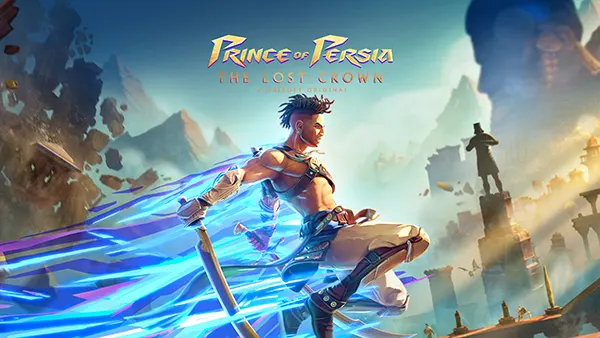
Prince of Persia: The Lost Crown (Mobile) — Port Review and Control Breakdown
Prince of Persia: The Lost Crown’s mobile release matters for one simple reason: this is a fast, precision-heavy action game that lives or dies by how it feels in your hands. The 2025 iOS/Android version isn’t a “lite” edition — it’s the full experience adapted for phones and tablets, with a free intro trial, offline play, and a serious set of input tools aimed at making touch controls workable without turning combat into a compromise.
What the mobile port gets right (and what to check first)
The headline feature is smoothness. Ubisoft positioned the mobile edition to run at up to 60fps on recent devices, and that target makes a real difference in a game built around parries, quick dodges, aerial juggling, and tight platforming. If your device can hold that frame-rate consistently, timing windows feel closer to console than many people expect from a phone action title.
The port is also built for real-world mobile use rather than “always online” assumptions. Being able to play offline changes how you approach longer areas and boss attempts, especially when you’re commuting or travelling. It also makes the free introduction trial more meaningful, because you can test performance and touch comfort in normal conditions, not just on your home Wi-Fi.
Before you even touch the settings, check two basics: screen size and grip. On compact phones, the default on-screen buttons can crowd the action; on larger phones and tablets, you may find the opposite problem — too much thumb travel. This is exactly why the mobile version leans so hard into custom layouts and remapping, and you’ll get a better first session by adjusting the controls early rather than “pushing through” a bad default.
Performance and value in 2026 terms
As of 2026, the mobile edition is a known quantity: it launched on iOS and Android on 14 April 2025, with pricing set at €14.99 in select markets and a lower launch price offered for the first three weeks. That matters because it frames the game less like a typical free-to-start mobile release and more like a premium port you buy because you want the full experience on the go.
In practical terms, your “value check” should be about stability and battery, not just visuals. If 60fps causes heat or throttling on your device, a lower cap can make inputs feel more consistent over long sessions. Consistency beats peak numbers here, because a parry that sometimes lands and sometimes doesn’t is usually a performance issue disguised as a skill issue.
If you’re deciding whether it’s worth playing on touch at all, the honest answer is: it depends on your tolerance for learning a new muscle memory. The port gives you enough tools to build a workable touch setup, but it still won’t feel identical to a dedicated controller. The key is choosing a control style that matches how you actually hold your device — and then sticking with it long enough to become automatic.
Touch controls: custom layouts, remaps, and the “feel” problem
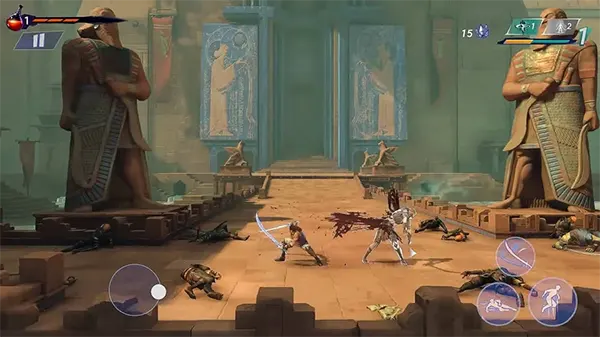
The mobile version’s touch scheme is not locked. You can adjust the size, position, and transparency of on-screen inputs, and you can remap actions so the layout matches your instincts rather than the developer’s defaults. That sounds simple, but it’s the difference between enjoying the combat system and constantly misfiring abilities because your thumb lands half a centimetre off.
Start by deciding what your thumbs should do most of the time. Movement and camera awareness are continuous; attacks, jumps, and parries are burst actions that need reliable taps. A good touch layout separates “always-on” zones from “precision” buttons, keeps the most-used actions close to your natural thumb resting point, and avoids stacking too many critical actions on the same side.
Next, treat transparency as a comfort tool rather than a cosmetic slider. If the UI blocks enemy tells or hazards, you’ll react late. If it’s too transparent, you’ll lose confidence about where the buttons are during frantic fights. Dial it to the point where you can see the screen clearly but still feel anchored when you’re chaining moves.
How to set up touch remapping without wasting time
The fastest path is to remap in small steps, then test immediately in a combat room or early traversal section. The game lets you enter the system menu and customise mobile controls, including an “Edit Controls” flow where you tap a button, move it, resize it, and adjust transparency. Use that loop like a tuning session: change one thing, test for two minutes, repeat.
If you’re struggling with parry timing on touch, don’t assume it’s only your reaction speed. The port includes mobile-friendly assists such as auto-parry, auto-potion, and time-slow options. You don’t have to leave these on forever, but they can help you learn encounter patterns first, then remove assistance later once your inputs are settled.
Finally, keep “advanced remapping” in mind if you want redundancy. Some players do better when a critical action has an alternative input option, especially on touch where a missed tap can happen mid-slide or mid-air. The goal isn’t to make the layout complicated — it’s to make failure modes less punishing when your hands are doing too much at once.
External controllers: when a gamepad is the smarter choice
If you already own a compatible controller, this is the most straightforward way to get a console-like feel. The mobile edition supports external controllers and allows full control remapping for them as well, so you’re not stuck with awkward defaults. For boss-heavy stretches and late-game platforming, a controller typically reduces friction immediately.
The biggest practical benefit is separation of duties. On touch, your right thumb is usually doing both camera awareness and attacks, even in a 2D game, because you’re also managing ability triggers and defensive actions. With a controller, your thumbs and fingers have dedicated roles again — movement, jump, attack, parry, abilities — and the game’s speed feels “honest” rather than cramped.
It’s also a consistency play. If your phone’s screen is slightly damp, if you’re wearing gloves, or if you’re in a setting where you can’t keep a perfect grip, touch reliability drops. A controller makes the input surface stable. That stability matters more than raw difficulty because the game’s design expects you to learn patterns, not wrestle your interface.
Controller mapping tips that actually improve play
Don’t start by copying a console layout blindly. Start by mapping parry and dodge to buttons you can hit without shifting your grip, because those two actions carry the most “must not fail” pressure in this game. Once defence is comfortable, map your most-used time powers to triggers or bumpers so they’re accessible without taking your thumb off movement.
The remap path is straightforward: with the controller connected, open the pause menu, head into the system/options area, and use the customise controls flow to change bindings. If something feels off, reset and redo it — a clean reset is faster than untangling a messy setup you no longer understand.
One final tip: treat mobile play as two distinct modes. Touch mode is great for exploration, short sessions, and quick progress on familiar routes. Controller mode is ideal for long sessions, new bosses, and any part of the game where you’re learning timing windows. Switching between these modes on purpose, instead of randomly, keeps your muscle memory from fighting itself.